
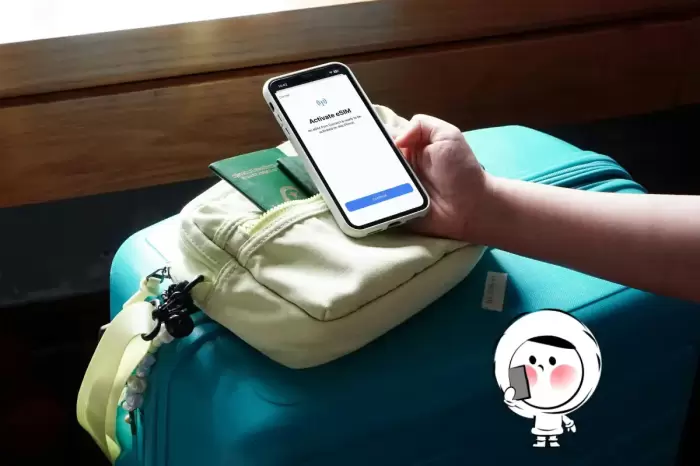
Your flight lands at 6:40 a.m. and the airport Wi-Fi wants a text code sent to a number you no longer have. That is the exact moment most international students discover that nothing on their arrival checklist works without mobile data.
Getting connected before you clear immigration solves four problems at once: booking a ride, navigating a strange city, telling your university and landlord you have arrived, and pulling up the address and check-in details for wherever you are sleeping that first night. A travel eSIM handles all four because it activates before you leave home. You install it while you still have home Wi-Fi, and it switches on the second you land. Below is how the first 48 hours actually play out, in order, plus the setup I would do before any long-haul flight.
Why the airport Wi-Fi assumption fails you
Free airport Wi-Fi sounds like a safety net until you need it. Many captive portals verify you by sending a one-time code to your regular number, and if you have already swapped your home SIM out or cancelled it, that code never arrives. Others time out every twenty minutes, which is fun when you are mid-way through a ride booking with your luggage on the curb.
Relying on roaming from home is the other common plan, and it usually gets expensive fast. Here is the part people underestimate. Airport Wi-Fi is a shared network with hundreds of strangers on it. Anything you would not shout across a terminal, do not type on it.
Do this before you board, not after
The single biggest mistake is buying a plan at the airport gate while staring at a departure screen. The setup is quick, but you want it done at home, on a stable connection, with time to test.
-
Check your phone supports eSIM. Most phones sold in the last several years do. If yours has a physical SIM tray only, this route is not for you.
-
Buy a plan that covers every country on your route, not just your destination. A layover in a third country can leave you dark if your plan covers one country only.
-
Install the eSIM before you leave home and label it clearly in your phone settings, so you are not guessing which line is which at 7 a.m.
-
Set your data line to the eSIM and keep your home number for calls. This keeps your bank codes and family calls working while data flows through the new plan.
-
Download offline maps and screenshot your key addresses as a backup, even with data. Screenshots are free, and they have saved me more than once.
For a longer trip or a semester abroad, the practical choice is usually a plan with enough data to last weeks rather than days. If you want a plan built for multi-country travel, you can browse available travel eSIM options and match one to your route before you fly.
Hours 1 to 3: the ride, the map, and getting out of the terminal
You land, you turn off airplane mode, and your eSIM is live. Now the sequence matters.
Open your ride app first. The pickup point at a big international airport is rarely the arrivals curb; it is usually a specific level or a numbered pillar. Your app routes you there with live location, and the driver calls or messages through the app, which works over data. That is why you want a data plan rather than a calls plan for this step.
Then start navigation before you get in the car. Watching your route in real time tells you whether the driver is taking a sensible path, and it means you can direct them if the address is confusing. This matters far more when you land in a city where the street names are in a script you cannot yet read.
One student I helped move to a mid-sized European city got dropped at the wrong building because she gave the driver her accommodation's marketing name instead of the street address. She had data and maps, which is how she figured it out in five minutes instead of an hour. Save your exact address as a pinned location before landing. It is the cheapest insurance on this list.
Hours 3 to 12: checking in and telling people you made it
Next in line is your temporary accommodation. Hotel and hostel apps increasingly use QR codes, digital keys, and self check-in kiosks, and every one of those needs a live connection. If your flight is delayed and you arrive after reception closes, your check-in instructions are almost certainly sitting in an email or an app that you cannot open.
So before landing, screenshot three things: your booking confirmation, the door code or check-in instructions, and the property's phone number. Then verify you can reach your university's student portal and your email once your eSIM is live. Welcome emails, enrolment deadlines, and orientation schedules all land in that window, and colleges are not known for sending those to your WhatsApp.
Reach out to the two people who need to hear from you: whoever is meeting you and whoever manages your housing. A short message with your location and arrival time removes a lot of worry on both ends. International student offices handle hundreds of arrivals a term, and the ones that run smoothly are usually the ones where the student communicated early.
The details that catch students out
Data-only plans do not include a phone number. Ride apps, email, and maps all run fine over data. Calls to local businesses from your phone will not. Use app-based calling for those.
Your eSIM stays your travel line. Once you settle and get a local number, keep the eSIM as a backup for regional trips. It costs nothing to leave installed and it is there when you cross a border.
Check data before you stream. A long video on a metered plan eats more than most people expect. Download shows on hotel Wi-Fi instead.
Verify your plan covers your region, not your country. Regional plans exist precisely because students travel during breaks. Confirm the country list before buying, since a plan that stops at the border is useless for a weekend trip. Per the International Air Transport Association, passenger demand keeps rising year over year, which means more crowded terminals and slower airport Wi-Fi, so your own connection matters more than it used to.
A short checklist you can run in ten minutes
-
Phone supports eSIM, confirmed in settings.
-
Plan purchased and covering every country on your itinerary.
-
eSIM installed and labeled before you fly.
-
Home number still active for codes and calls.
-
Exact accommodation address saved and pinned.
-
Booking, door code, and property phone number screenshotted.
-
University portal and student email login tested on arrival.
-
Offline map of your landing city downloaded.
None of this is complicated. It is just the kind of thing nobody tells you until you are standing in a terminal at dawn, watching a loading spinner. The association for international educators reports that more students cross borders for study every year, and they all hit the same first-day wall with data. Handle it before you board and landing day becomes just another flight, not a crisis.
Two questions worth asking yourself before you book anything: does your plan cover every country you will touch, and can you open your accommodation's door instructions without the airport Wi-Fi? Answer those honestly and pack accordingly. Everything else on arrival day can wait until you have had some sleep.